12More in-world objects · 5 min read
Demo boxes
In the appStore → Demos
A shopper touches the box and gets your demo items for free. Plurion records who took the demo, then counts who bought the real product afterwards. You see which demos sell, and how fast.
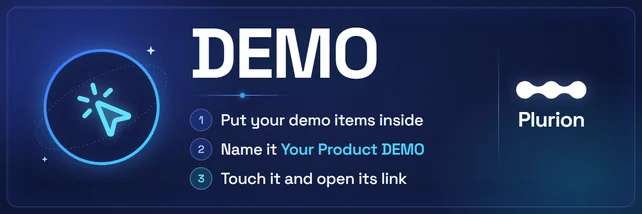
Rez it from your Starter PackPlurion [Demo]
- A shopper touches the demo box
- The box hands over its items
- Plurion records the grab
- A later purchase of the product counts as bought after
The box gives first and reports after. If Plurion can’t be reached, shoppers still get their demo.
Setting one up
- In Second LifeRez the panelDrag
Plurion [Demo]from your inventory onto your land. Your chat says “registered. Touch the demo to get your link.” - In Second LifePut your demo items insideRight-click the panel → Edit → Content, then drag your demo items in.
- In Second LifeName it after the productFor the product Aurora Dress, name the box Aurora Dress DEMO. Plurion reads the name, minus the word DEMO, to find the product.
- In Second LifeTouch it and open its linkTouch the box, then click Go to page in the “Link this demo to your Plurion dashboard” window.
- On the webConnect it to your shopSign in if asked, as the avatar who owns the box. With one shop, the page connects it by itself. With several, choose the shop under Link it to and click Connect to …. You land on
Demos.
One demo, many boxes
Plurion knows a demo by its name. Every box named Aurora Dress DEMO, in any region, adds to the same demo. Rename a box and it becomes another demo.
To put the demo in several spots, Shift-copy the box. The copy joins your shop on its own. For another product, rename the copy and swap its items.
Linking a demo to a product
The first grab links the demo when the name is a sure match: a family with that name, then a product with that name, then the only product whose name starts with it. Anything less sure waits on Demos under + Link a product, with up to three suggestions.
Link a demo to a family to count a purchase of any version of the item. To change a link, click it on Demos and pick another product or family.
What counts as bought after
A shopper counts once per demo, from their first grab. They count as bought after if they later buy the linked product, or any product of the linked family. Sales you import count too.
The Demos page
| Part | What it shows |
|---|---|
| Period | Week, Month, 90 days or Year, each compared with the period before. |
| The four cards | Demos taken, Bought after with the L$ of those sales, Conversion, and Time to buy: the median delay from first grab to first purchase. |
| Alerts | A box that hasn’t checked in for over a day, a demo that converts much less than the period before, a demo with grabs but no product linked. |
| Rhythm | Grabs and purchases per day, per week over a year. |
| Latest grabs | The last takers by name (owner, admins and managers only), and whether they bought. |
| Demos | One row per demo. Top converter and Needs attention flag the best and the weakest. Click a row for its boxes in-world, with region and position. |
Reminding the ones still deciding
Still deciding lists the people who took a linked demo 2 to 30 days ago and haven’t bought it. Click Remind next to a name, or Remind all.
Each person gets one message in their local chat, from your DropBox. If the demo box holds a notecard, they also get the first one. Plurion reminds a person once per demo.
Turn on Auto-remind and it goes out by itself, 48 h after a take. Edit message sets its words ({name}, {product}, {shop}, {when} and {link} are filled in). {link} is a teleport to the box, or a link to the product’s Marketplace listing. Without it, the link goes at the end.
Customers can turn these reminders off with the Receive demo reminders from … switch, on their page at your shop. Their name then shows Reminders off, and nothing is sent to them.
The owner menu
| Button | What it does |
|---|---|
| Get demo | Gives you the demo, without counting it. |
| Print Info | Writes the box’s id, demo, region and item count in your chat. |
| Reset identity | Starts over as a new demo box. The old one leaves your dashboard, but its grabs stay. |
Marketplace and imported demos
A free sale with DEMO in its name, on the Marketplace or imported from another system, counts as a demo. Each take shows up on Demos with its source, and stays out of Sales and Customers. A paid demo stays a sale.
Link it once to its product, like a box, to see who bought after trying it. A reminder to these shoppers goes to their local chat only, unless one of your demo boxes has the same name and holds a notecard.
How often can a shopper take the demo?
How do I remove a box?
Demos, open the demo and click the bin next to the box. Its grabs stay in your figures.What if my shop is suspended?
Where did my free DEMO sales go?
Demos. A free take of a demo listing isn’t a sale, so it’s no longer in your Sales, your totals or your customer list.