Vendor System
for Second Life.

Manage your vendors, send offers to past customers,
run automatic sales, track visitors and conversion rates.
And that's just the start.

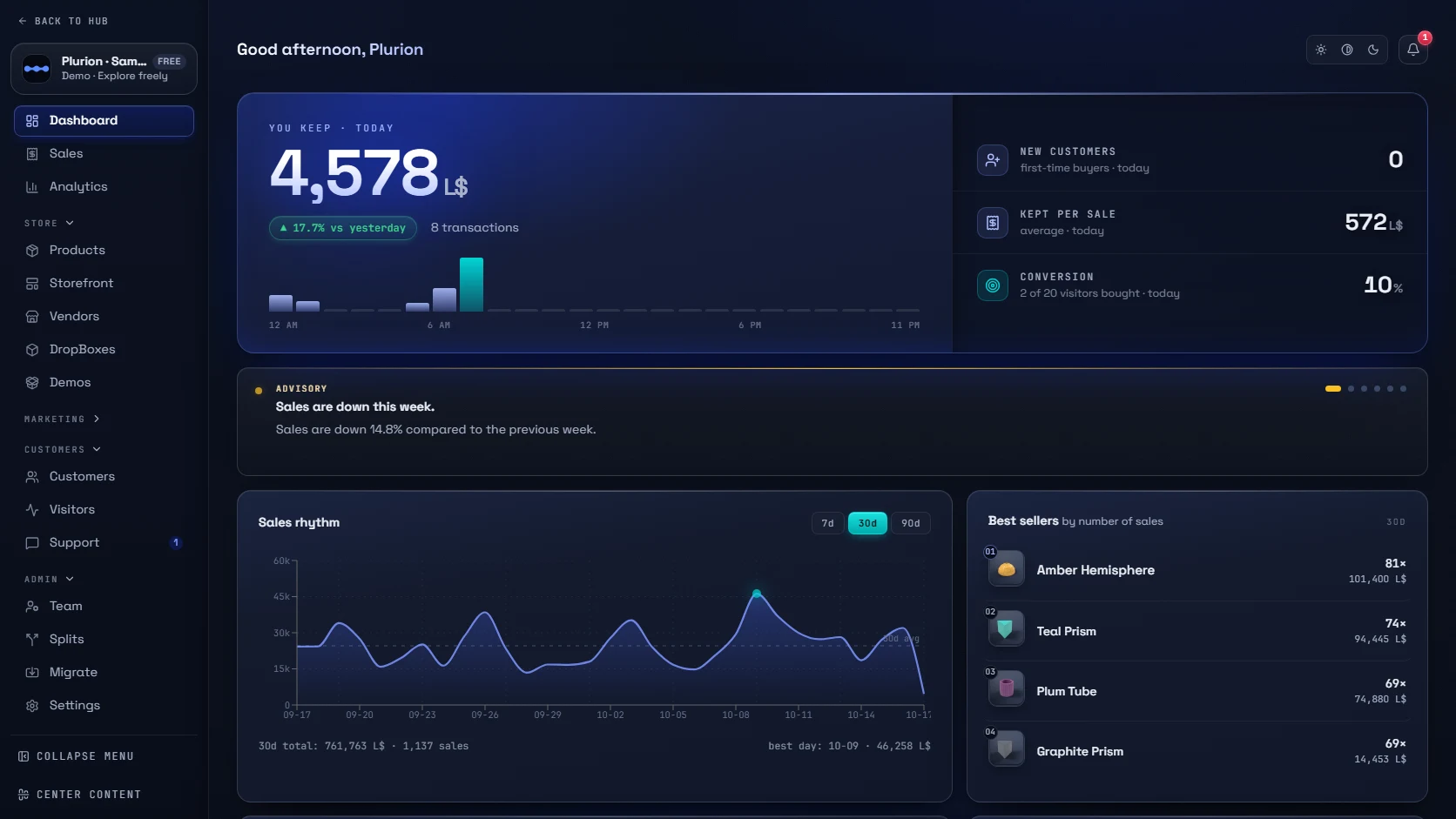
Plurion on a phone: the sales dashboard, and a sale notification arriving
  • Keep your vendors
  • Try before you switch
  • Manage from anywhere

Features worth a closer look.

L$250 −30%
L$175 L$250
FRI 00:00MON 00:00
Back to normal · Monday 00:00

Black Friday in one click

Set a discount and pick the dates. Prices go back to normal on their own when the sale ends.

See more
  • Whole shop, or only the products you pick.
  • Every vendor in every region updates on its own.
  • Pause and resume the sale at any time.
−30%
L$200L$140

Sneaker owners get the hoodie cheaper

Customers who own one product get money back on another. They don’t need a code, and you don’t need to be online.

See more
  • Works even if they bought the first item years ago.
  • They pay the regular price; the vendor sends the discount back right away.
  • Or give them the second item as a gift instead.
One
dropmigrates your
existing vendor

Keep the vendors you already have

Drop the Migration Kit into one. It becomes a Plurion vendor on the spot, with the same look, position and size.

See more
  • One vendor at a time; the others keep selling.
  • Each one pauses for about 30 seconds.
  • If a conversion fails, your vendor is left exactly as it was.
online

Your online shop builds itself

Every product you create appears in it. Customers pay with store credit and receive their item in-world.

See more
  • Hide a product online and keep selling it in-world.
  • Stock is checked before customers are charged.
  • See at a glance how much store credit you owe.

Support that doesn’t get lost in your IMs

Customers open a ticket about something they bought. You and your team answer from one inbox.

See more
  • Each ticket shows the product and the sale.
  • It starts in-world and continues on the web, in one thread.
  • Internal notes and saved replies for your team.
L$ L$ L$

Know your conversion rate

See who walked in, who came back and who bought.

See more
  • Who’s in your shop right now.
  • Each visitor’s history, linked to what they bought.
  • One counter or several, across all your regions.

Every tool in your dashboard.

Start here

Dashboard

Your morning glance: sales, revenue and shop traffic.

Sales

Every sale, searchable, with the detail behind each one.

Analytics

See what sells, where and when, compared with the period before.

Catalog

Products

Everything about a product in one place: price, picture, listing and availability.

Vendors

All your vendors: where each one stands, what it sells and the picture it shows.

DropBoxes

Your inventory in one object instead of a copy inside every vendor.

Demos

Hand out demos on touch, and see who bought after trying.

Marketing

Updates

Push a new version to the people who already bought it.

Codes

Make promo codes here. Buyers enter them on the vendor: right-click → Promo.

Discounts

A sale across the whole shop or product by product, with start and end dates.

Loyalty

Customers who own one product get money back on another.

Gift Cards

Gift cards and store credit, with the total you owe.

Gacha

Random prizes from your catalog, with published odds, delivered like any sale.

Collabs

One product made by several creators: each piece ships from its creator’s DropBox, and each creator is paid at the sale.

People

Support

Tickets opened in-world, answered here, with what they bought beside the message.

Customers

Lifetime spend, best buyers, and who is in the shop right now.

Visitors

Who walked in, who came back, and how many bought.

Splits

Share revenue in L$ the moment a sale happens. Everyone sees their own earnings.

Team

Invite your team and choose what each person can access.

Admin

Migrate

Import your products and convert the vendors you already have, without rebuilding your shop.

Settings

Shop profile, notifications, keys, data export and deletion.

All 22 are live today.

Not ready to switch? Don't.

Watch first
  • Free
  • 0% fees

Keep your system.

Plurion mirrors the sales of your current system and notifies you.
Your vendors don’t change.

How watching works →
Full migration
  • 5% per sale
  • Pro: 0%

Switch at your own pace.

Convert one vendor at a time.
The others keep selling.

How conversion works →

Close the laptop. Not the shop.

  • On your home screen

    Opens full screen like an app.
    Nothing to download or update.

  • Know when it happens

    Sales, tickets and customer activity,
    wherever you are.

  • Fix it from your phone

    Tap the alert, open the sale,
    redeliver in one click.

Your shop stays yours.

Every payment is verified before a product is delivered. Your shop data is protected, with backups in case something goes wrong. And if you ever decide to leave Plurion, you can take your data with you.

Frequently asked questions.

Straight answers if you already run a vendor system.

All questions, by topic →
What do I have to rez?

Up to three objects, depending on what you need: a Visitor Sphere, a Delivery DropBox and a Plurion Terminal. See each one.

What happens to my product list?

Import the file your current system exports. Plurion recognizes the format on its own, so you don’t need to clean it up first.

What does it cost?

The Free plan has every feature and takes 5% of each sale. It isn’t a trial, so it doesn’t run out. Pro removes the 5% for a fixed price. Compare the plans.

Can my customers buy from a browser?

Yes, with nothing to set up. Every product you create appears in your online shop. Customers pay there with store credit and gift cards, even when you’re offline.

Start with one vendor.

Every other vendor keeps working as it is, and your customers won’t notice a thing.