30Settings & plans · 4 min read
Plans & billing
In the appYour Hub (app.plurion.io/hub) → Billing
Each shop has its own plan, so some can run on Free and others on Pro.
Free vs Pro
| Free | Pro | |
|---|---|---|
| Price | L$0 | Monthly: L$3,900 for 30 days Yearly: L$39,000 for 365 days |
| Commission | 5% of each sale | 0% |
| Features | Every feature | Every feature |
| How you pay | The 5% leaves with each sale | Prepaid, in Second Life, at the Merchants Terminal |
The commission is the only difference. Free has no limit on objects or sales. Yearly costs ten months and gives you twelve.
How the 5% is taken
On Free, your vendor sends Plurion 5% of what the buyer actually paid, at the moment of the sale, the way it pays a split partner. It’s worked out after any sale, promo code or loyalty discount, and rounded down. Nothing is invoiced and nothing builds up. It’s one reason your vendor asks for the DEBIT permission.
- Charged: sales by your Plurion vendors, gacha pulls (on the pull price), and store credit or gift cards bought at your Plurion Terminal (once, when bought).
- Never charged: sales imported from another system, or mirrored live from CasperVend or the Marketplace, since they didn’t go through a Plurion object.
- Small sales: under L$20, the 5% rounds down to 0 and nothing is sent.
On Splits, the 5% shows as a locked line, Plurion fee (see The Plurion fee rule). It counts in the total, so on Free your own split rules can share at most 95% of a sale.
Going Pro at the Merchants Terminal
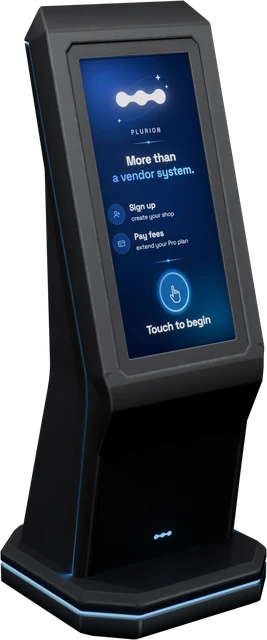
Find it in-worldPlurion Merchants Terminal
In Second Life, an object can be paid but can’t charge you. So you prepay Pro at the Merchants Terminal at Plurion HQ, where you signed up. Teleport to Plurion HQ (Atlantic Coast 128, 129, 23) on the avatar that owns the shop.
- In Second LifeTouch the terminalA menu opens. Choose Pay fees.
- In Second LifePick the shop“Which shop to extend?” lists the shops your avatar owns. Click the one to put on Pro.
- In Second LifePick a plan“Choose your plan:” click Monthly (L$3,900, 30 days) or Yearly (L$39,000, 365 days).
- In Second LifePay the price it showsChat shows the exact price. Right-click the terminal, choose Pay and press the only amount offered. The terminal waits only 90 seconds between steps, so don’t pause.
If the terminal answers something else
| The terminal says | What to do |
|---|---|
| “[Plurion] busy with another payer - try again in a few seconds.” | It serves one payer at a time. Wait a few seconds and touch it again. |
| “[Plurion] session expired - touch the terminal again to start over.” | More than 90 seconds passed between two steps. Nothing was charged. Start again. |
| “[Plurion] no Plurion shop on your account yet - touch again and pick "Sign up" to get started.” | This avatar owns no shop. Sign up first, or come back on the avatar that owns the shop. |
| “[Plurion] backend error (…) - your payment is recorded; the owner will sort your Pro time.” | Your L$ reached Plurion, but the time wasn’t added automatically. Plurion is alerted and adds it by hand. To follow up, write on Discord with the time you paid. |
Your Pro time
Pro is prepaid time. Nothing renews on its own, and nothing is taken from your wallet. Pay again whenever you like. New days add to what’s left, so paying early wastes nothing.
Your Billing page
On your Hub, click Billing (next to Edit profile and Settings). Each shop you own has a card: Free, or Pro with “Pro · expires in N days” and the end date. History lists every payment. You can’t pay from this page.
Common questions
Can a teammate pay Pro for my shop?
Does Pro stop the 5% straight away?
I stopped selling. Is unused Pro time refunded?
A 5% transfer failed. What happens?
Splits, as Plurion fee. See A share wasn’t paid.