10More in-world objects · 5 min read
The Plurion Terminal
In the appNo page of its own. What it sells shows in Sales and Marketing → Gift Cards
The Plurion Terminal is the object your customers touch to open their page, buy store credit or send a gift. It saves you most “I lost my item” messages, since customers redeliver their purchases themselves.
Not to be confused with the Merchants Terminal at Plurion HQ, where you pay your plan. This one is yours, from your Starter Pack (Your Plurion objects).
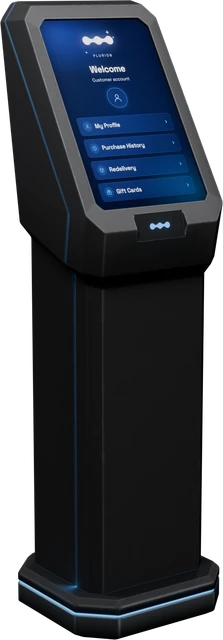
Rez it from your inventoryPlurion [Terminal]
- A customer touches the terminal
- Access my page: their purchases, store credit and support requests
- Buy credit: adds L$ to their own store credit at your shop
- Send a gift: store credit for someone else
Setting it up
Stay in the terminal’s region until the end, since Second Life only shows the DEBIT window to an owner who is in the region.
- In Second LifeRez
Plurion [Terminal]where customers will see itNear your entrance or your redelivery corner. After a few seconds, red floating text appears above it: “NOT LINKED - touch me for your link”. - In Second LifeTouch it and open its linkYour viewer offers to open “Link this terminal to your shop” (the link is in your chat too). Click Go to page.
- On the webConnect it to your shopSign in if asked, as the avatar who owns the terminal. With one shop, the page connects it by itself. With several, choose the shop under Link it to, then click Connect to ….
- In Second LifeAccept DEBITBack in Second Life, your chat says “linked: ready for customers.” Then Second Life asks you to let the terminal take L$ from your account (why). Click Allow access.
If something’s off
| You see | Do this |
|---|---|
| No DEBIT window, or customers hear “payments are paused here for now.” | Touch the terminal yourself, from its region. Until DEBIT is granted, each of your touches asks again. Click Allow access. |
| The page says “This object belongs to a different avatar” | Sign in with the Plurion account of the avatar who owns the terminal in Second Life. |
| The page says “This link has expired” | Links last 24 hours. Touch the terminal for a fresh one. |
What your customers see
A touch opens this menu, with your shop’s name on top. The terminal serves one customer at a time and asks others to touch it again in a moment.
To pay, the customer right-clicks the terminal → Pay and types any amount. Each step waits about a minute and a half before the session expires.
Access my page
Opens the customer’s own page at your shop, with their purchases (and redelivery where you allow it), their store credit, your online shop and their support requests. No account or password needed. Each touch makes a one-time link, valid 15 minutes (The customer hub).
Buy credit
The customer adds L$ to their store credit at your shop. The L$ reach you at once, and the payment shows in Sales as a Top-up. They spend the credit later in the online shop on their page.
Send a gift
The customer types the recipient’s username (first.last, like jane.doe, not their display name), confirms the name, adds a message or types skip, then pays any amount. The recipient gets a message in their local chat, and the credit waits on their account. The buyer gets a card link to share (Gift cards & store credit).
Where the money goes
Whether a customer buys credit here for themselves or as a gift, it’s real L$ in your account at once. At the same time, the terminal pays your shop-wide split partners and, on the Free plan, Plurion’s 5%. Spending the credit later moves no more L$.
- A customer pays L$100 at the terminal
- L$100 of store credit on their balance, and a Top-up in your Sales
- At once, the terminal pays L$10 to your partner and L$5 to Plurion
- You keep L$85
Split rules set on a single product aren’t paid on credit, since nobody knows yet what it will buy.
Banned customers
A customer you banned can’t buy credit, send a gift or receive one at your terminal. The terminal refuses before any money moves, or refunds on the spot. At ban level 2 or 3, they can’t open their page either (Banning a customer).
Move, copy or start over
| I want to… | Do this |
|---|---|
| Start over, or move it to another shop | Touch it → Reset identity, then touch it again and choose the shop. It’s the only way, since the terminal has no dashboard page. Gifts and credit already sold stay recorded. |
| Add another terminal | Shift-drag a linked one (or Take Copy and rez it), in any region. The copy joins the same shop, with nothing to link. Accept DEBIT for it. In another region it takes a few minutes. |
| Move it | Take it and rez it again, in any region. It stays the same terminal. |
| Give it away | It forgets your shop and starts over for its new owner. |
If you still have the old redelivery terminal or gift kiosk
They keep working, so nothing breaks while you switch. But each does only one of the three things. Replace them with a Plurion Terminal next time you tidy your shop.